
Class Meeting-11: October 8, Wednesday, 10:50 – 1:35 PM (Week-6)
Course Syllabus: https://pxstudio.us/blog/?p=75636
The Password for Opening Blog Posts: 0808-fa25
Course Syllabus: https://pxstudio.us/blog/?p=75636
Zoom Link for Screen-Sharing:
https://utrgv.zoom.us/j/3146949266 | Meeting ID: 314 694 9266
Topics for the Week-6 Lectures
- HTML Audio & Video (10/6)
- Brief Review for the P1C Project (10/6)
- Homework: Essential Resources for Learning Webflow (10/4-5)
- UI/UX Design Trend 2025 (10/6)
- Brief Review for the App Design Project & Essential Resources for Learning Xd(10/6)
- Review Questions for Preparing HTML Quiz (10/8)
Question Review for Preparing HTML Quiz
Q1: What does HTML stand for?
HTML stands for Hypertext Markup Language. It is the standard markup language for creating Web pages by tagging text files to achieve font, color, graphic, and hyperlink effects on World Wide Web pages.
Q2: Please circle the correct HTML 5 document tag, and indicate what attribute is always been used for the html tag in the U.S.?
- <!DOCTYPE HTML5>
- <!DOCTYPE HTML PUBLIC “-//W3C//DTD HTML5.0//EN”>
- <!DOCTYPE html>
- <!DOCTYPE html PUBLIC “-//W3C//DTD XHTML1.1//EN”>
- <html lang=”en”>
Q3: The <head> tag is the container tag containing all head elements that describes meta data; such as:
- <title></title>
- <meta>
- <link>
- <style></style>
- <script></script>
Q4: Which tag displays its contents at the top of the browser window but not inside window itself?
The <title> tag defines a title for your HTML document. It is required in every HTML document.
The <title> element:
- defines a title in the browser toolbar
- provides a title for the page when it is added to favorites
- displays a title for the page in search-engine results
The <title> tag displays its contents at the top of the browser window but not inside window itself.
Q5: Please list 4-6 most commonly used HTML tags.
- <html></html> – Define an HTML document
- <title></title> – Defines a Title of the page
- <head></head> – Defines information about the documents and header part of the page.
- <body></body> – Defines a document body
- <div></div> – Defines Division
- <p></p> – Defines a Paragraph
- <li></li> – Defines a list item
- <nav></nav> – Defines a navigation system and menu bar
Q6: Please list at least 10 most common HTML tags, and list six most common HTML5 tags.
HTML is a very simple markup language. Even though there are close to 100 tags in HTML5, you usually only end up using a handful 99% of the time. Let’s list the 20 most common HTML tags for creating a web page:.
- <html></html>
- <head></head>
- <title><title>
- <body></body>
- <b></b>
- <p></p>
- <i></i>
- <br>
- <hr>
- <h1></h1>-<h6></h6>
- <ul></ul> / <li></li>
- <a></a>
- <img>
- <div></div>
- <nav></nav>
- <header></header>
- <aside></aside>
- <footer></footer>
- <section></section>
- <article></article>
- <audio></audio>
- <video></video>
- <main></main>
Q7: Which color mode is used in web design when you design a web page? When writing an HTML document, which color is used to identify the page body’s white background color and black text color?
The color mode of RGB is used for designing a web page and other screen based designs. In an HTML document, the six-digit hexadecimal color is used to identify the page body’s background color and text color. For example, “#FFFFFF” is used to identify the white color, and “#000000” is used to identify the black color.
http://www.w3schools.com/colors/colors_picker.asp
Q8: Please list at least three HTML tags which do not require a closing tag when coding an HTML document.
https://pxstudio.us/pdf/html-tags.pdf
- <br>
- <hr>
- <img>
- <link>
Q9A: Please explain the usage of the heading tags, and list all heading tags.
The <h1> to <h6> tags are used to define HTML headings. The <h1> tag defines the most important heading. The <h6> defines the least important heading.
Q9B: To pass the HTML validation, which tag(s) should always be used under the <section> tag and <article> tag?
To pass the HTML validation, one of the following heading tags must be used under the <section> tag and <article> tag.
- <h1></h1>
- <h2></h2>
- <h3></h3>
- <h4></h4>
- <h5></h5>
- <h6></h6>
Q10: The <hr> tag is used to define a thematic change in the content. Please further explain the definition and usage of the tag.
The <hr> tag defines a thematic break in an HTML page (e.g. a shift of topic). It creates a horizontal line based on a width of the browser window or a specified measurement. The <hr> element is used to separate content (or define a change) in an HTML page.
Q11: Please talk about the usage of <a> tag
The <a> tag defines a hyperlink, which is used to link from one page to another. The most important attribute of the <a> element is the href attribute, which indicates the link’s destination.
By default, links will appear as follows in all browsers:
- An unvisited link is underlined and blue
- A visited link is underlined and purple
- An active link is underlined and red
For example: <a href=”fusion.html”>Type Fusion</a>
Q12: Please circle at least two obsolete HTML tags.
- <font></font>
- <menu></menu>
- <center></center>
- <color></color>
Q13: <ul> tag and <li> tag are function tags. They always work together to display certain part of web page. Please tell they are used to display what part of web page? Please indicate two functions which <ul> tag and <li> tag can create.
The <ul> tag defines an unordered (bulleted) list while the <li> tag defines a list item. Use the <ul> tag together with the <li> tag to create unordered lists. It can also been used to create a navigation bar.
For example:
<ul>
<li>Coffee</li>
<li>Tea</li>
<li>Milk</li>
</ul>
Q14A: The <img> defines an image in an HTML page. It has two required attributes. Please indicate both of them.
• <img src=”images/img-1.jpg alt=”img-1″>
Q14B: How to set up the width and height for the <img> tag if you prefer to address responsive images?
width: 100%;
height: auto;
Q15A: What is the correct HTML5 element for playing audio and video files? To pass the HTML validation, which tag and attribute should always be used under the tag? and what is the main difference between HTML4 and HTML5?
- <audio>
<source src=”media/xxx.mp3″ />
<source src=”media/xxx.ogg”/>
</audio> - <video width=”420” height=”315” controls>
<source src=”media/xxx.mp4″ type=”video/mp4” />
<source src=”media/xxx.webm” type=”video/webm” />
<source src=”media/xxx.ogg” type=”video/ogg” />
</video>
Q15B: Please indicate at least one difference between HTML 4 and HTML 5
The main difference between HTML and HTML 5 is that video and audio are not part of HTML 4 while these both are integral parts of HTML5 specifications.
https://www.sitesbay.com/html5/html5-difference-between-html-and-html5
Q16: Which tag displays the comment text in the code view and source code but hides the comment in browser window.
Add comments in an HTML document by using comment tag: <!- -xxx- ->
Add comments in a CSS document: /*comment*/
The comment tag is used to insert comments in the source code. Comments are not displayed in the browsers. You can use comments to explain your code, which can help you when you edit the source code at a later date. This is especially useful if you have a lot of code.
For example: </div><!–end content div–>
Q17: Please list three most common selector types of CSS, and explain the different usages for using ID and Class.
- ID selector
- Class selector
- Tag selector
In the CSS, a class selector is a name preceded by a full stop (“.”) and an ID selector is a name preceded by a hash character (“#”). The difference between an ID and a class is that an ID can be used to identify one element, whereas a class can be used to identify more than one.
THE USAGE OF HTML 5 TAGS & ATTRIBUTES
https://www.w3schools.com/TAgs/tag_html.asp
What is HTML5?
HTML stands for HyperText Markup Language. It is a standardized system for tagging text files to achieve font, color, graphic, and hyperlink effects on World Wide Web.
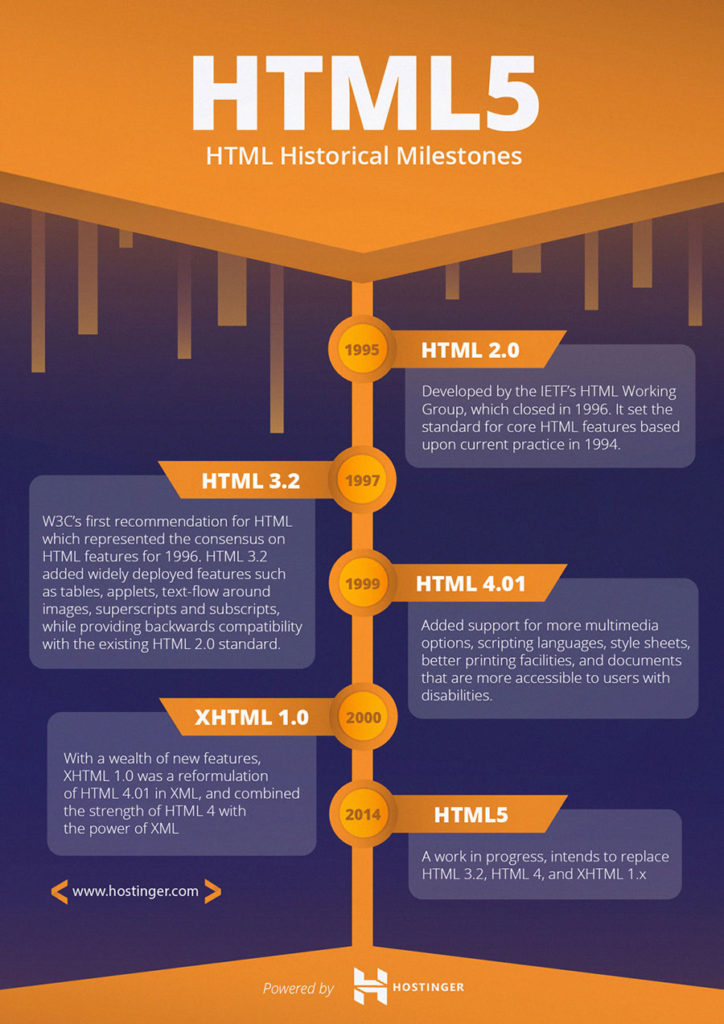
HTML5 is a core technology markup language of the Internet used for structuring and presenting content for the World Wide Web. As of October 2014 this is the final and complete fifth revision of the HTML standard of the World Wide Web Consortium (W3C). HTML5 is the new HTML standard. It is :
- Evolution of HTML 4 and DOM level 2
- Removal or redefinition of presentational markup
- Formalized foundation-level APIs
- The evolution of the browser into a programming platform
What’s new in HTML5?
- New Elements and Attributes
- Full CSS3 Support
- HTML Video and Audio
- 2D/3D Graphics
- SVG Support
- SQL Database
- Web Applications
The internet, and the use of the internet, has changed a lot since HTML 4.01 became a standard in 1999. Today, some elements in HTML 4.01 are obsolete, never used, or not used the way they were intended. These elements are removed or re-written in HTML5. To better handle today’s internet use, HTML5 also includes new elements for better structure, better form handling, drawing, and for media content.
W3 Schools / HTML5 Introduction
HTML Reference
HTML5 – New Elements
HTML5 Tags
HTML Global Attributes
HTML Event Attributes
HTML5 vs. HTML4
The Descriptions and Usages of HTML Tags
<html></html> tag tells the browser that this is an HTML document. It is the container for all other HTML elements except for the DOCTYPE> tag
<head></head> The <head> element is a container for all the head elements. The following tags describes meta data: <title>, <style>, <meta>, <link>, and <script>. They can be covered between the opening tag and closing tag of <head> tag.
- <meta> description tag provides metadata about the HTML document. Meta elements are typically used to specify page description, keywords, author of the document, last modified, and other metadata. The metadata can be used by browsers (how to display content or reload page), search engines (keywords), or other web services.
The Unicode Consortium develops the Unicode Standard. Their goal is to replace the existing character sets with its standard Unicode Transformation Format (UTF).The Unicode Standard has become a success and is implemented in HTML, XML, Java, JavaScript, E-mail, ASP, PHP, etc. The Unicode standard is also supported in many operating systems and all modern browsers. The Unicode Consortium cooperates with the leading standards development organizations, like ISO, W3C, and ECMA.
The Unicode Character Sets
Unicode can be implemented by different character sets. The most commonly used encodings are UTF-8 and UTF-16. A character in UTF-8 can be from 1 to 4 bytes long. UTF-8 can represent any character in the Unicode standard. UTF-8 is the preferred encoding for e-mail and web pages. - <title></title> tag is required in all HTML documents and it defines the title of the document in the browser toolbar.
- <link> tag defines a link between a document and an external resource. It is especially used to link to external style sheets.
- <style></style> tag is used to define style information for an HTML document. It is usually used to specify internal CSS styles. Each HTML document can contain multiple <style> tags.
- <script></script> tag is used to define a client-side script, such as a JavaScript. The <script> element either contains scripting statements, or it points to an external script file through the src attribute.
<body></body> tag defines the document’s body. It contains all the contents of an HTML document, such as text, hyperlinks, images, tables, lists, etc.
<a></a> tag defines a hyperlink, which is used to link from one page to another. The most important attribute of the <a> element is the href attribute, which indicates the link’s destination.
<img> tag defines an image in an HTML page. It has two required attributes: src and alt.
<hr> tag is used to separate content (or define a change) in an HTML page.
<br> tag inserts a single line break. It is an empty tag which means that it has no end tag. You may apply double <br> to get extra space without using <p> tag.
<p></p> tag defines a paragraph. Browsers automatically add some space (margin) before and after each <p> element. The margins can be modified with CSS (with the margin properties).
<h1> – <h6> tags are used to define HTML headings. <h1> defines the most important heading. <h6> defines the least important heading.
<hgroup> tag is used to group a heading set of <h1> to <h6>, when a heading has multiple levels (subheadings).
<div></div> tag defines a division or a section in an HTML document. It is used to group block-elements to format them with CSS. Most browsers will display the <div> element with the default values: display: block;
<ul></ul> tag defines an unordered (bulleted) list. Use the tag together with the
- tag to create unordered lists and nested lists.
<ol></ol> tag defines an ordered lists
<li></li> tag defines a list item. It is used in ordered lists, unordered lists, and in menu lists.
Inline Tags:
<abbr></abbr> tag defines an abbreviation or an acronym, like “Mr.”, “Dec.”, “ASAP”, “ATM”. Marking up abbreviations can give useful information to browsers, translation systems and search-engines.
<span></span> tag is used to group inline-elements in a document. <span> is usually used to style a part of a text.
<strong></strong> or <mark></mark> or <b></b> tag specifies bold text or highlighted text
<em></em>or<i></i> tag defines a part of text in an alternate voice or mood. The content of the <em> tag or <i> tag is usually displayed in italic.
New HTML5 Tags:
<!DOCTYPE html> (the document type declaration tag is one of the declaration tags in HTML/indicate the document is using HTML code)
<!–xxx–> the comment tag is used to insert comments in the source code. Comments are not displayed in the browsers. You can use comments to explain your code, which can help you when you edit the source code at a later date. This is especially useful if you have a lot of code.
<nav></nav> tag defines a set of navigation links. The <nav> element is intended only for major block of navigation links.
<header></header> tag represents a container for introductory content or a set of navigational links. You can have several <header> elements in one document. However, a <header> tag cannot be placed within a <footer> or another <header> element. A <header> element typically contains:
- one or more heading elements (<h1> – <h6> and <hgroup>)
- logo or icon
- authorship information
- top banner of the web page
<main></main> tag specifies the main content of a document. The content inside the <main> element should be unique to the document. It should not contain any content that is repeated across documents such as sidebars, navigation links, copyright information, site logos, and search forms.
Note: There must not be more than one <main> element in a document. The <main> element must NOT be a descendent of an <article>, <aside>, <footer>, <header>, or <nav> element.
<aside></aside> tag defines some content aside from the content it is placed in. The <aside> content could be placed as a sidebar.
<iframe></iframe> tag specifies an inline frame. An inline frame is used to embed another document within the current HTML document. The new attribute of <iframe> tag is seamless which specifies the <iframe> should look like it is a part of the containing document.
<footer></footer> tag defines a footer for a document or section. You can have several <footer> elements in one document. A <footer> element typically contains:
- footer navigation menu
- authorship information
- copyright information
- contact information
- sitemap
- back to top links
- links for related documents
- sub-links
- social media links
<article></article> tag specifies independent, self-contained content. A heading tag always work with the <article> tag.
<section></section> tag defines sections in a document, such as chapters, headers, footers, or any other sections of the document. A heading tag always work with the <section> tag.
<audio></audio> tag defines sound, such as music or other audio streams. Currently, there are 3 supported file formats for the <audio> element: MP3, Wav, and Ogg.
<video></video> tag specifies video, such as a movie clip or other video streams. Currently, there are 3 supported video formats for the video element: MP4, WebM, and Ogg.
<embed></embed> tag defines a container for an external application or interactive content.
<source> tag is used to specify multiple media resources for media elements, such as <video> and <audio>. The source tag always work together under the <audio> tag, <video> tag, or embed> tag.
<track> tag specifies text tracks for media elements (<audio> and <video>). This element is used to specify subtitles, caption files or other files containing text, that should be visible when the media is playing.
<wbr> tag specifies where in a text it would be ok to add a line-break. When a word is too long, or you are afraid that the browser will break your lines at the wrong place, you can use the <wbr> element to add word break opportunities.
<svg> tag defines graphic drawing using SVG
All New HTML5 Elements:
http://www.w3schools.com/html/html5_new_elements.asp