Illustrating Words
in Photoshop CS6

Posted by: Ping

Today’s demonstrations: • How to combine type and shape (Photoshop) • How to insert pictures into type (Photoshop) • How to modify letterforms (Photoshop CS6 • How to drop a shadow for text (Photoshop) • How to add a stroke for text (Photoshop) • How to emboss the type (Photoshop) • How to apply an […]
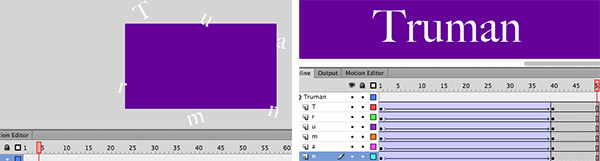
A-341 Demo: Explode

Posted by: Ping

1. Cmd N, and choose purple as the bgcolor 2. Rename the layer “Truman“, and type Truman on the stage (white Time 80 pt.) 3. Select the text: Modify > Break Apart or Cmd B, to break the text to 6 individual boxes 4. Click the layer Truman to select all text boxes: Modify > Timeline […]

A-341 Demo:
Echo Animation in Flash CS6

Posted by: Ping

Echo Effect / Phase-I 1. Cmd N, and save the file to “echo.fla” 2. Choose the Type Tool to type “VISCOM 2012” and make sure Classic Text / Static Text / Anti-alias for animation are selected in Properties panel before typing. 3. Choose the bgcolor to purple and type color to white 4. Cmd K […]